
- Hard Skills vs Soft Skills: What Goes on a Resume
- Where to Put Your Skills Section
- How to Format Your Skills Section
- How Many Skills Should You List?
- Skills List by Industry
- Using Skills as ATS Keywords
- Frequently Asked Questions
- How to Demonstrate Skills Through Work Experience
- Transferable Skills: A Career Changer's Best Asset
- Skills That Are Not Worth Listing
- Keeping Your Skills Section Current
- Using Skills in Your Resume Summary
- When to Turn Skills Into Certifications
- How Skills on Your Resume Translate to the Interview
- Skills Section Final Checklist
The skills section is one of the most misunderstood parts of a resume. Most people either list too many generic soft skills that mean nothing, or dump every tool they have ever touched without any context.
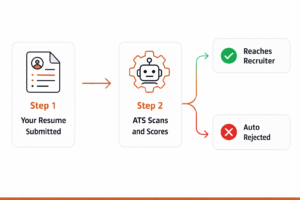
Done right, your skills section does two things simultaneously: it gives ATS software the keywords it needs to match your application to the job, and it gives a human recruiter a fast, scannable picture of what you bring. This guide shows you exactly how to do both.
Hard Skills vs Soft Skills: What Goes on a Resume
Hard Skills vs Soft Skills
Hard Skills
Specific, teachable, measurable abilities
- Python, SQL, JavaScript
- Adobe Photoshop, Figma
- QuickBooks, SAP, Salesforce
- CPR certification
- CDL-A license
- Google Analytics
Soft Skills
Interpersonal and character-based traits
- Communication
- Problem-solving
- Leadership
- Time management
- Teamwork
- Adaptability
Hard skills belong prominently in your skills section because ATS systems search for them by keyword. Soft skills are tricky. Listing “excellent communicator” as a standalone skill means nothing. Every candidate says they are a good communicator.
The right way to handle soft skills is to demonstrate them through your bullet points rather than declare them as a list. Instead of listing “leadership” in your skills section, show it in your work experience: “Managed a team of 8 engineers, mentoring 3 junior developers who were promoted within 18 months.”
Where to Put Your Skills Section
The placement of your skills section depends on your experience level and the type of role you are applying for.
After work experience. Your job history is your strongest credential so lead with that. Skills reinforce what your bullets already demonstrated.
After your summary, before work experience. Your transferable skills are the argument for why you are relevant to a new field. Lead with that argument.
After education. You have limited work history so skills and coursework carry more weight early in your resume.
Often placed right after the summary because technical stack is the first thing hiring managers and ATS systems check for.
How to Format Your Skills Section
Keep it clean and scannable. There are two formats that work well:
Option 1: Simple list with categories
Technical Skills
Python, SQL, Tableau, Excel (advanced), Google Analytics, BigQuery
Tools and Platforms
Salesforce, HubSpot, Jira, Slack, Notion, Asana
Methods
A/B Testing, Cohort Analysis, Agile, Sprint Planning
Option 2: Single comma-separated list (simple and ATS-safe)
Python · SQL · Tableau · Excel · Google Analytics · Salesforce · A/B Testing · Agile · Jira · HubSpot
Do not use skill bars, star ratings, or percentage meters. These look visually interesting but they are meaningless (what does 4 out of 5 stars in Excel actually mean?) and they confuse ATS parsers.
Avoid This
Python ████████░░ 80%
Skill bars are subjective, unverifiable, and invisible to ATS. Replace with specific tools and concrete examples in your bullet points.
How Many Skills Should You List?
Between 8 and 15 is the sweet spot for most resumes. Enough to show range and cover the important keywords, not so many that the section becomes a wall of text no one reads.
The most common mistake is listing too many obvious skills. If you are applying for a marketing role, listing “Microsoft Word” and “email” is not useful. Save the space for skills that actually differentiate you.
Skills List by Industry
Here are reference lists for the most common industries. Pick the most relevant ones for your specific role.
Technology and Software
Python, JavaScript, Java, SQL, HTML/CSS, React, Node.js, AWS, Azure, GCP, Docker, Kubernetes, Git, Agile, Scrum, REST APIs, Machine Learning, Data Analysis, Tableau, Power BI
Marketing and Communications
SEO, SEM, Google Analytics, Google Ads, Facebook Ads, HubSpot, Mailchimp, Salesforce, Content Strategy, Copywriting, A/B Testing, Email Marketing, Social Media Management, Canva, Adobe Creative Suite
Finance and Accounting
QuickBooks, SAP, Excel (advanced), Financial Modeling, Budget Analysis, GAAP, Accounts Payable, Accounts Receivable, Payroll Processing, Forecasting, Tableau, NetSuite, Xero
Healthcare and Nursing
Patient Assessment, Electronic Health Records (EHR), Epic, Cerner, CPR and BLS Certified, IV Insertion, Medication Administration, Wound Care, HIPAA Compliance, Care Planning, Triage, EMR Documentation
Project Management
PMP Certified, Agile, Scrum, Waterfall, Jira, Asana, Monday.com, Trello, MS Project, Risk Management, Stakeholder Management, Budget Management, Resource Allocation, Cross-functional Team Leadership
Sales and Business Development
Salesforce, HubSpot CRM, Cold Outreach, Pipeline Management, Account Management, B2B Sales, SaaS Sales, Negotiation, Objection Handling, Territory Management, Sales Forecasting, LinkedIn Sales Navigator
Customer Service
Zendesk, Intercom, Freshdesk, CRM Software, Conflict Resolution, De-escalation, Active Listening, Ticket Management, SLA Compliance, Multilingual Support, Live Chat, Onboarding
Using Skills as ATS Keywords
Your skills section is one of the most important places ATS systems look for keyword matches. Here is how to make it work:
Before (Generic)
Communication, Teamwork, Problem Solving, Microsoft Office, Leadership, Organization
After (Targeted to Job Description)
Salesforce CRM, HubSpot, B2B Pipeline Management, Cold Outreach, Account-Based Marketing, Sales Forecasting, SaaS Sales, LinkedIn Sales Navigator
The second version uses the exact language from a sales job description. It will score significantly higher in ATS matching and immediately show a human recruiter that you understand the role.
The process: read the job description, highlight every skill and tool mentioned, check which ones honestly apply to you, add them to your skills section using the exact phrasing used in the posting.
For a complete guide to keyword optimization and how ATS scoring works, read our ATS resume optimization guide.
Frequently Asked Questions
Should I list Microsoft Office as a skill on my resume?
Only if it is relevant to the job and you have a specific proficiency worth mentioning. Listing “Microsoft Word” in 2026 is like listing “can use email.” It goes without saying. However “Excel (advanced), including pivot tables, VLOOKUP, and financial modeling” is a specific and credible skill worth including for finance, operations, or analytics roles.
How do I list skills I am still learning?
Include them if you have enough working knowledge to use them on the job. Add context if helpful: “Python (intermediate, 18 months of use).” Do not list a skill you could not discuss in an interview. Misrepresenting your level will surface quickly in any technical screening.
Should I include hobbies or personal interests in my skills section?
No. Hobbies and interests belong in a separate optional section at the bottom of your resume if you include them at all. They should never appear in your skills section which is strictly for professional and technical competencies.
What is the difference between skills and competencies?
For resume purposes they are effectively the same thing and you can use either term as your section heading. Some resumes use “Core Competencies” which can feel more senior and strategic. “Skills” is simpler and more widely used. Both work equally well with ATS systems.
For the full resume writing guide covering every section from contact information to references, read how to write a resume.
Not sure if your skills section is hitting the right keywords for the role you want? Run your resume through our free AI Resume Checker for an instant keyword gap analysis.
How to Demonstrate Skills Through Work Experience
Listing a skill is easy. Proving you have it is what separates strong resumes from weak ones. The best resume strategy combines a clean skills section for ATS scanning with work experience bullet points that actually demonstrate those skills in action.
Think of it this way: your skills section tells the ATS and recruiter what you can do. Your work experience bullet points show them evidence that you actually did it. Both are necessary. Neither alone is sufficient.
Skill Listed
Data Analysis
Skill Demonstrated (Work Experience Bullet)
“Analyzed 3 years of customer behavior data across 50,000+ accounts to identify churn patterns, leading to a targeted retention campaign that reduced quarterly churn by 12%.”
Skill Listed
Team Leadership
Skill Demonstrated (Work Experience Bullet)
“Led a cross-functional team of 9 including engineers, designers, and product managers to deliver a platform migration 3 weeks ahead of schedule and $40K under budget.”
The skill in your skills section gets you past the keyword filter. The bullet point in your work experience convinces the recruiter the skill is real. You need both working together.
Transferable Skills: A Career Changer’s Best Asset
If you are changing careers, transferable skills are the bridge between where you have been and where you want to go. These are skills that are genuinely valuable across different industries and roles, not just in your previous field.
The key is framing. The same experience described differently can sound either completely irrelevant to a new field or directly applicable to it.
Transferable Skills Example: Teacher Moving to Corporate Training
Original Framing (Teaching)
- Taught high school English to 120 students
- Developed lesson plans and curriculum
- Assessed student performance and gave feedback
Reframed (Corporate Training)
- Delivered instructional programs to 120+ learners annually
- Designed curriculum and learning materials from scratch
- Evaluated competency through structured assessments and feedback
The experience is identical. The language makes it relevant to a completely different industry. This is the craft of career transition resume writing.
Most valuable transferable skills regardless of industry:
- Project management and coordination
- Budget management
- Written and verbal communication
- Data analysis and reporting
- Client or stakeholder management
- Process improvement
- Team leadership and mentoring
- Research and problem-solving
Skills That Are Not Worth Listing
Some skills are so commonly expected or so vague that listing them adds nothing to your resume and wastes space that could be used for something meaningful.
Skills not worth listing on a modern resume:
- Microsoft Word and Microsoft PowerPoint, expected of every professional in 2026. Only list Microsoft Office skills if you have a genuinely advanced level (e.g., Excel with VBA macros, complex financial modeling) that goes beyond standard use
- Email, not a skill worth mentioning
- Internet research, also assumed
- “Fast learner”, every candidate says this, it is meaningless without proof
- “Team player”, show collaboration through your bullets, do not claim it as a listed skill
- “Attention to detail”, deeply undermined if your resume has any typos at all
- “Passionate about [industry]”, passion is not a skill
- Basic social media platforms, only worth listing if you have managed professional accounts with measurable results
Replace any of these on your resume with something specific and verifiable. The space is more valuable than a generic claim.
Keeping Your Skills Section Current
Your skills section should be a living part of your resume that you update at least every six months, whether you are actively job searching or not.
Industries move fast. The tools that mattered two years ago in your field may have been replaced or supplemented by new ones. If your skills section still lists legacy software that your industry has moved away from, it can actually date your resume and signal that you have not kept up.
A simple habit: every time you complete a new certification, learn a new tool, or use a new methodology in a project, add it to your master resume immediately. Do not wait until you start a job search to reconstruct what you have learned. By the time you are actively applying, your skills section should already be current and accurate.
Skills Section Update Checklist
- Remove any tool or technology you have not used in two or more years
- Add any new certifications or courses completed
- Add any new tools or platforms you are using regularly at work
- Check if the job descriptions you are targeting use different terminology for your existing skills
- Remove generic soft skills that are not supported by your bullet points
Using Skills in Your Resume Summary
Your professional summary is one more place to weave in critical skills keywords, especially the ones that define your professional identity. But the approach here is different from the skills list. In the summary, skills should be embedded in context rather than listed in isolation.
Skills Drop-In (Weak)
“Experienced in Python, SQL, Excel, Tableau, communication, leadership, and problem-solving.”
Skills in Context (Strong)
“Data analyst with 4 years of experience using Python and SQL to extract insights from large datasets, and Tableau to communicate findings to non-technical stakeholders. Led a team that identified a pricing inefficiency that recovered $400K in annual revenue.”
The second version naturally includes the same keywords while also telling a story. It passes the same ATS keyword checks while also being far more compelling to read.
When to Turn Skills Into Certifications
Some skills carry much more weight when they are backed by a recognized certification. If you have a skill that you use professionally and there is a widely respected certification for it, getting certified can transform that line on your resume.
High-value certifications by field:
Technology: AWS Certified Solutions Architect, Google Cloud Professional, Microsoft Azure certifications, CompTIA certifications, PMP (Project Management Professional), Certified Scrum Master.
Data and Analytics: Google Data Analytics Certificate, Tableau Desktop Specialist, Microsoft Power BI Data Analyst, SAS Certified Data Scientist.
Marketing: Google Analytics Certification, HubSpot Inbound Marketing, Meta Blueprint, Google Ads certifications, Hootsuite Social Marketing.
HR and Recruiting: SHRM-CP (Society for Human Resource Management), PHR (Professional in Human Resources), LinkedIn Recruiter certifications.
Finance: CPA (Certified Public Accountant), CFA (Chartered Financial Analyst), CFP (Certified Financial Planner), Series 7 and 63 licenses.
A certification turns “I know SQL” into “Google-certified data analyst with SQL proficiency.” The difference in credibility is significant, especially when competing against candidates with similar experience levels.
List certifications either within your skills section or in a dedicated certifications section depending on how many you have. Two or fewer can go in skills. Three or more warrant their own section.
How Skills on Your Resume Translate to the Interview
Everything you put in your skills section is fair game in an interview. Recruiters and hiring managers use your skills list as a roadmap for technical screening questions. If you list a skill, be ready to discuss it in real depth.
This has two implications. First, never list a skill you cannot speak to confidently in an interview. Claiming advanced Excel on a resume and then struggling with a basic pivot table question in an interview is one of the fastest ways to lose an offer after making the shortlist.
Second, your skills section is actually a preparation tool for your own interview prep. Go through each skill you listed and ask yourself: what is the strongest specific example I have of using this skill? What problem did I solve with it? What result did it produce? If you can answer those three questions for every skill on your resume, you are well prepared for most interview questions.
Skills-to-Interview Preparation Framework
Skill: Salesforce CRM
Example: “Used Salesforce to build a pipeline dashboard that gave our sales team real-time visibility into deal stages. Identified a bottleneck at the proposal stage that was causing 30% of deals to stall. Worked with the team to fix the follow-up process and increased our close rate by 18% over one quarter.”
Skill: Project Management
Example: “Led a website redesign project across a team of 6 including design, development, and content. Managed the timeline in Asana, ran weekly standups, and delivered the project 2 weeks ahead of the launch deadline despite a mid-project scope change.”
Having a specific, quantified story for each of your top five to eight skills means you are ready for competency-based interview questions from the moment you walk in the door. The preparation you put into your resume becomes the preparation you need for your interviews.
Skills Section Final Checklist
Before you submit your resume, run your skills section through this quick check:
- Every skill listed can be discussed confidently in an interview
- Skills are tailored to match the specific job description
- Exact keyword phrasing from the job posting is used where applicable
- No generic soft skills appear as standalone list items
- No outdated tools or technologies from two or more years ago
- The most relevant skills for this role appear first
- Skill bars, star ratings, and percentage meters are not used
- Number of skills listed is between 8 and 15
- At least three of the skills listed are also demonstrated through achievement bullet points in work experience