
- What Is an ATS and Why Does It Matter
- How ATS Actually Reads Your Resume
- 7 Resume Mistakes That Fail ATS Immediately
- How to Find and Use the Right Keywords
- ATS-Friendly Resume Formatting Rules
- Why You Must Tailor Your Resume for Every Application
- ATS Optimization Checklist
- After the ATS: Writing for the Human Reviewer Too
- Frequently Asked Questions
You spent two hours on your resume. You tailored it carefully. You hit submit. Then nothing.
There is a good chance your resume never reached a human at all. Over 75% of resumes are rejected by Applicant Tracking Systems before a recruiter ever opens them. Not because the candidate was unqualified. Because the resume was not formatted for the software reading it first.
This guide explains exactly how ATS works, what kills most resumes, and what you can do right now to fix yours.
What Is an ATS and Why Does It Matter
An Applicant Tracking System is software that companies use to collect, sort, and filter job applications before a human reviews them. When you apply for a job online, your resume almost certainly goes into an ATS first.
The system scans your resume for keywords, qualifications, and formatting it can read. It scores your application against the job description. If your score is too low, your resume gets filtered out automatically. The recruiter never sees it.
This is not a niche corporate practice. Over 98% of Fortune 500 companies use ATS. So do the majority of mid-sized businesses. If you are applying for jobs online, you are dealing with ATS whether you know it or not.
The Most Widely Used ATS Platforms
The most common systems you will encounter are Workday, Greenhouse, iCIMS, Lever, Taleo, and BambooHR. Each has slightly different parsing behaviour but they all follow the same core principles covered in this guide.
How ATS Actually Reads Your Resume
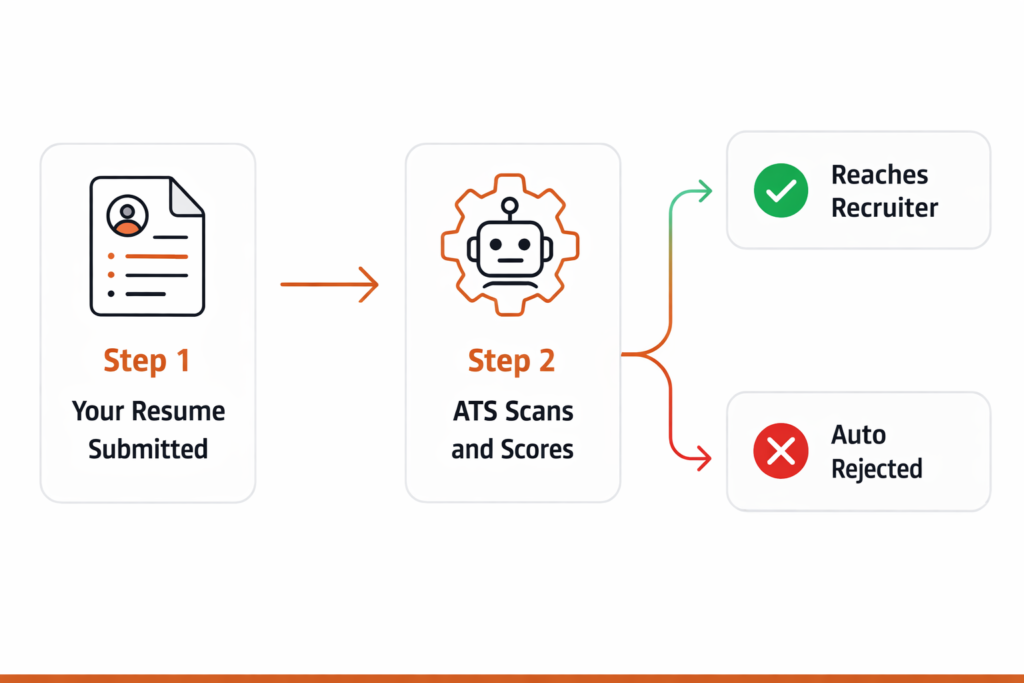
Here is what happens the moment you hit submit on a job application:
Step 1, Parsing. The ATS extracts text from your resume and breaks it into categories: contact information, work experience, education, skills. If your resume uses tables, columns, headers, footers, or unusual fonts, the parsing can fail completely. Your experience section might end up blank in the system even though it looks perfect on your screen.
Step 2, Keyword matching. The system compares your resume text against the job description. It looks for exact and near-exact matches. If the job posting says “project management” and your resume says “project leadership,” many ATS systems will not match them.
Step 3, Scoring. Your resume gets a relevance score. Most companies set a minimum threshold. Resumes below that score are automatically rejected or deprioritized. Only those above the threshold move forward to a human reviewer.
Understanding this three-step process is everything. Most ATS problems happen at Step 1 (formatting) or Step 2 (keywords).
7 Resume Mistakes That Fail ATS Immediately
These are the most common reasons well-qualified candidates get filtered out before anyone reads their resume.
1. Using a Two-Column Layout
Two-column resumes look clean and professional to a human eye. To most ATS software they are a disaster. The system reads left to right across the entire page, merging both columns into garbled text. Your job title from column one gets mixed with your skills from column two and the result is unreadable.
Fix: Use a single-column layout for any resume you are submitting online.
2. Putting Key Information in Headers or Footers
Many resume templates put contact details in the document header. Most ATS systems cannot read content placed in Word document headers and footers. Your phone number and email become invisible to the system.
Fix: Put all your contact information in the main body of the document, at the top of the page.
3. Using Tables to Organize Skills
A skills table looks neat but ATS parsing often reads table content incorrectly or skips it entirely. Your entire skills section can disappear from the system’s view.
Fix: List skills as plain text, either as a comma-separated list or simple bullet points.
4. Saving as PDF When the Job Requires Word
PDF compatibility with ATS has improved but it is still inconsistent. Some systems handle PDFs well, others misread them badly. When a job posting specifies Word format, always use Word.
Fix: Default to .docx unless the job posting specifically asks for PDF or your industry standard is PDF (such as academic or design roles).
5. Using Non-Standard Section Headings
ATS systems look for specific heading names to categorize your information. If you write “Where I Have Been” instead of “Work Experience,” the system may not recognize it as an experience section at all.
Fix: Use standard headings only: Work Experience, Education, Skills, Certifications, Summary.
6. Missing Keywords From the Job Description
This is the most common and most damaging mistake. If the job posting mentions “Salesforce” five times and your resume never mentions it, your keyword score will be low even if you use Salesforce every day.
Fix: Read the job description carefully and mirror its exact language in your resume where it honestly applies to your experience.
7. Using Graphics, Icons, or Images
Profile photos, skill bar graphics, icons next to section headings, decorative lines. All of these confuse ATS parsers. They cannot read images. What looks like a polished design to you looks like missing data to the software.
Fix: Remove all graphics and images from resumes submitted online. Save the designed version for in-person interviews or portfolio use.
How to Find and Use the Right Keywords
Keyword optimization does not mean stuffing your resume with every term from the job posting. It means making sure the language you use matches the language the employer used.
Step 1: Analyse the Job Description
Read the job posting and highlight every skill, tool, qualification, and responsibility mentioned. Pay particular attention to:
- Job title variations (the ATS may score exact title matches higher)
- Technical skills and software names
- Certifications or qualifications listed as required vs preferred
- Industry-specific terminology
- Soft skills mentioned repeatedly
Step 2: Match Your Language to Theirs
If the job says “stakeholder management” and you wrote “managing relationships with clients and partners,” the ATS may not match them. Rewrite your bullet point to use their exact phrase where it is accurate.
A simple before and after example:
Before (low ATS score)
“Worked with different departments to improve how projects were delivered across the company.”
After (keyword optimized)
“Led cross-functional stakeholder management across 4 departments to improve project delivery timelines by 22%.”
The second version uses the exact phrase “stakeholder management” from the job description, adds a quantified result, and starts with a strong action verb. It scores better with ATS and reads better to a human.
Step 3: Place Keywords in the Right Sections
ATS systems weight certain sections more heavily than others. Keywords appearing in your summary, job titles, and work experience bullet points carry more weight than keywords in a standalone skills list. Place your most important keywords in at least two different sections.
What About Keyword Stuffing?
Do not do it. Repeating the same keyword ten times does not improve your score and makes your resume unreadable to the human reviewer who comes after the ATS. One to three natural uses of a key term across your resume is enough.
ATS-Friendly Resume Formatting Rules
Follow these formatting rules for every resume you submit online and you will avoid the vast majority of ATS parsing failures.
Font: Arial, Calibri, Times New Roman, or Garamond. Size 10 to 12 for body text. Nothing unusual, nothing decorative.
Layout: Single column only. No text boxes. No tables for layout purposes. No columns created with tabs or spaces.
File format: .docx as your default. Use PDF only if explicitly requested or if your industry expects it.
Section headings: Use standard names. Bold them if you like but keep the text itself conventional.
Bullet points: Standard round bullets only. Avoid arrows, checkmarks, custom symbols, or icons. These sometimes render as question marks or get skipped entirely.
Margins: Between 0.5 and 1 inch on all sides. Anything smaller and some ATS systems clip the content.
Length: One page for under five years of experience. Two pages maximum for most professionals. ATS does not penalize length but recruiters do.
For a complete breakdown of resume layout including fonts, spacing, and design rules that work for both ATS and human readers, see our resume layout and formatting guide.
Why You Must Tailor Your Resume for Every Application
One resume sent to every job is the single biggest reason qualified candidates get rejected by ATS. The system compares your resume to one specific job description. A generic resume that is reasonably good for everything scores poorly against any specific role.
Tailoring does not mean rewriting your entire resume every time. It means making three targeted adjustments for each application:
1. Update your summary. Two or three sentences that speak directly to this specific role and company. Takes five minutes.
2. Mirror keywords from the job posting. Add the exact terms they used where they honestly apply to your experience. Remove skills that are not relevant to this role.
3. Reorder your bullet points. Move the most relevant achievements to the top of each job entry. ATS and recruiters both read top to bottom. Your best material should come first.
This process takes 15 to 20 minutes per application. It is the highest return activity in your entire job search.
ATS Optimization Checklist
Before submitting any resume, run through this checklist:
- Single column layout with no tables or text boxes
- All contact information in the main body, not in a header
- Standard section headings: Summary, Work Experience, Skills, Education, Certifications
- Standard font at readable size (10 to 12pt)
- No graphics, icons, photos, or decorative elements
- Saved as .docx unless PDF was specifically requested
- Keywords from the job description included naturally in at least two sections
- Job titles use standard industry language, not internal company jargon
- Bullet points use standard bullets only
- Dates are formatted consistently (Month Year or MM/YYYY throughout)
- No spelling errors (ATS keyword matches are case-insensitive but typos break exact matches)
The fastest way to know how your resume scores against ATS criteria is to test it directly. Our free AI Resume Checker gives you an instant ATS compatibility score, identifies missing keywords, and tells you your single most impactful fix. No sign-up required, results in under 30 seconds.
After the ATS: Writing for the Human Reviewer Too
Passing the ATS is only half the job. Once your resume reaches a recruiter, it has about six seconds to make an impression. A resume that is perfectly optimized for ATS but reads like a list of keywords will not survive human review.
The good news is that the same things that make a resume good for humans also help with ATS: clear structure, specific achievements, relevant skills, and concise language. The two goals are not in conflict. They both reward resumes that are clear, honest, and targeted.
The mistake to avoid is optimizing so heavily for ATS that your resume loses its voice. Recruiters can tell when a resume has been keyword-stuffed. It reads as robotic and raises questions about the candidate’s actual communication skills.
For a complete walkthrough of writing every section of your resume from scratch, including work experience bullet points and professional summaries, read our full guide on how to write a resume.
Frequently Asked Questions
Does every company use ATS?
Not every single one. Very small businesses and startups with fewer than 10 employees often review resumes manually. But once a company is large enough to receive more than 50 applications per role, an ATS is almost always involved. If you are applying through any online job board or company careers page, assume ATS is in the process.
Can ATS read PDF resumes?
Modern ATS platforms have improved PDF support significantly. However compatibility varies between systems and PDF versions. A PDF created by saving from Word usually parses better than one created by design software like Canva or Adobe Illustrator. When in doubt, submit .docx and offer PDF as a secondary option.
Do I need a different resume for every job?
Not a completely different resume. But you should tailor your summary and keywords for each application. Think of it as having one master resume with all your experience, then creating a targeted version for each application by adjusting the summary, reordering bullets, and mirroring the job description’s language.
What ATS score do I need to pass?
Every company sets its own threshold and most do not publish what it is. As a general target, aim to match 60 to 75 percent of the keywords and requirements listed in the job description. Our free AI Resume Checker gives you a compatibility score so you can see where you stand before submitting.
Does ATS care about resume design?
ATS does not reward good design and it actively penalizes designs that interfere with text parsing. Graphics, columns, tables, and unusual fonts all create parsing problems. A plain, clean, single-column Word document will consistently outperform a beautifully designed visual resume in ATS scoring.
Need an ATS-friendly resume template to start from? Download one of our free resume templates built specifically for ATS compatibility.